Showing posts with label plsql. Show all posts

12 October, 2015

Oracle B Tree and Bitmap Index | Internal working

Oracle B-tree indexes
B-tree indexes are ordered lists of values divided into ranges with a key associated with a row or range of rows, thereby providing excellent retrieval performance for queries such as exact match and range searches.
This type of index contains 3 types of blocks - the root block, one or more branch blocks and one or more leaf blocks. The root block holds keys and pointers to the branch blocks which in turn hold pointers to the leaf blocks which contain the key (data) values that have been indexed and the rowids of the rows in the Oracle database table associated with each key value.
Branch blocks hold the minimum key prefix needed to be able to choose the required branch and a pointer to the child block containing the key. The number of keys and pointers is limited by the block size. Index leaf blocks are double linked - each block contains pointers to the next and previous leaf blocks.
B-tree indexes are always balanced because the height of the index (the number of levels in the index) is the same throughout the index. In other words, the number of blocks that have to be read to find the rowid associated with any particular index value is not dependent on that value. For example if you had an index on the last_name column of the employee table in the sample Oracle database the number or blocks that would need to be read to find the rowid associated with "Ernst" would be the same as for "King".
The height of a b-tree index is the number of blocks required to go from the root block to a leaf block. For an index with one level of branch blocks the height is 3 (1 root block + 1 branch block + 1 leaf block).

Oracle bitmap indexes
Bitmap indexes are completely different to b-tree indexes. Whereas b-tree indexes are ideal for storing highly selective/unique values (low cardinality), bitmap indexes are designed to store values of low cardinality where the same value can be found in a large proportion of the table. An example of this might be the part number column in the sales table, or gender in the employee table.
With this type of index, each distinct value of the column is associated with a set of bits representing the rows in the table (one bit for each row in the table). Each bit has a value of 0 or 1. If the bit is set then then the row associated with that bit has that value in the column.
Bitmap indexes are expensive to maintain as the whole bitmap has to be rebuilt after any DML operation (insert/update/delete) on the table.

25 July, 2015

How Many Ways a Cursor Can Be Defined In Oracle

Wandering down the roads of Oracle resources, I found an open article related to Oracle Cursors. It is a blog by Steven Feuerstein who has written many books on pl sql and Oracle in general.
The article is about the ways a cursor can be defined in Oracle.

24 July, 2015

More on Oracle Autotrace and TKprof


Autotrace is quite easy to use and provides useful info about the query statistics. It should be the first tool to be used for perf. Testing an application.

Autotrace provides many of the TRACE and TKPROF statistics such as disk reads and total reads.

The main difference between the AUTOTRACE and EXPLAIN PLAN commands in Oracle is that AUTOTRACE actually executes the query (in the way TRACE does) and automatically queries the plan table, whereas EXPLAIN PLAN does neither.


It can be used from SQL*Plus and provides query stats on the screen.


Options for the Autotrace –

• autotrace on – Enables all options.
• autotrace on explain – Displays returned rows and the explain plan.
• autotrace on statistics – Displays returned rows and statistics. 
• autotrace trace explain – Displays the execution plan for a select statement without actually executing it. "set autotrace trace explain"
• autotrace traceonly – Displays execution plan and statistics without displaying the returned rows. This option should be used when a large result set is expected.

Performance Tuning | Components of a trace file


Components of a trace –


Sample of a TKPROF’ed file


PARSE – the phase where Oracle finds the query in the shared pool(called soft parse) or creates a new plan(hard parse)

EXECUTE – this is the work done by Oracle in the OPEN or EXECUTE part of the statement. It will be empty for SELECT stmt.

FETCH – will have the most part of processing in case of a SELECT stmt, but would be mostly empty in case of an UPDATE stmt.


COUNT – Gives count on how many times this phase of the query was performed. Ideally, the parse count of a query should be 1 and execute count can be 1 or more. In a properly written application, the parse count will be 1.

CPU – amount of cpu time spent in thousands of seconds.

ELAPSED – The actual clock time spent on the query. If the elapsed time is quite large than the value of cpu time, then it means oracle spent time waiting for something.

DISK – how many physical I/Os were performed on the query. Like we have 34 physical I/O reads in the above query.


QUERY – Number of logical I/Os performed to retrieve consistent mode blocks. Generally all physical I/Os result into a logical I/O.

CURRENT – number of logical I/Os performed to retrieve blocks as of now. This is used in cases when DML is performed in the query, like an UPDATE stmt. In this case, the query data must be retrieved in the current mode.

ROWS – The number of rows processed/ affected by this phase. For update, this value would be populated in the Execute phase, and in case of a SELECT stmt, this value would be in Parse phase.

Implicit vs. Explicit cursors

Implicit vs. Explicit


Both the above are purely conceptual things and for Oracle engine, both are same. But implicit cursors are more efficient and easy to deal with.


Implicit

Explicit

begin

  for x in ( select * from t )

  loop

     process x;

   end loop;

end;

declare

   cursor c is select * from t;

   l_rec c%rowtype;

begin

   open c;

   loop

      fetch c into l_rec;

      exit when (c%notfound);

      process l_rec;

   end loop;

   close c;

end;

/


Both these have no performance benefit over the other. But for explicitly defined cursors, there is more code that needs to be written and hence chances of programmatic errors are more.

Oracle pointers - Part 001

Composite Index

In a composite index, the selected columns should be chosen wisely as this impacts the index performance. The more the columns of a composite index are used in the WHERE clause , the faster would be the execution. The rule is most commonly used column should do first in the composite index.

---------

Cardinality

This is the measure of distinct values of a set. And in terms of database, cardinality is defined as the number of distinct rows returned by a query.

-----------

HINTS -

ALL_ROWS- It instructs the optimizer to fetch the last row of the result-set as fast as possible. non-interactive, batch mode type of application would benefit from this.

FIRST_ROWS - It instructs the optimizer to fetch the first row to the client as fast as possible. An interactive, typical end-user application would benefit from it.

Some tables used by optimizer to gather statistics

It’s a list of some tables which optimizer uses to gather various statistics related to the database tables.

select * from user_tables
where table_name ='EMP'

 
select * from user_tab_statistics
where table_name ='EMP'
 

select * from user_tab_col_statistics
where table_name ='EMP'

 
select * from user_tab_histograms
where table_name ='EMP'
and column_name = 'EMPID'

08 July, 2015

Oracle Collections : Introduction

A collection is an ordered group of elements which have the same data type and we use subscripts to actually access those elements.

There are three types of collections provided by Oracle:

  1. Index-by Tables / Associative Arrays
  2. Nested Table
  3. Variable size array / Varray

Index by Table / Associative Array
Each stored data unit is in the form of KEY-VALUE pair. The keys are unique and it can be either a string or an integer.

TYPE type_name IS TABLE OF element_type [NOT NULL] INDEX BY sucscript_type;

table_name type_name;

Below is an example showing how to use associatibe array:

TYPE salary IS TABLE OF NUMBER INDEX BY varchar2(20);
salary_list salary;

--Adding elements to this ass. array

salary_list('ram') = 15000;
salary_list('lakshman') = 7050;
salary_list('bharat') = 35000;
salary_list('shatrugan') = 5000;

--Now using the collection elements

name := salary_list.FIRST;
WHILE name IS NOT NULL LOOP
DBMS_OUTPUT.PUT_LINE ('Salary of '||name||' is '||TO_CHAR(salary_list(name));

name := salary_list.NEXT(name);


END LOOP;

END;
/

Elements of a index-by table can be %ROWTYPE data of a database table; or it could be %TYPE of a single column of the table.


NESTED TABLES

Its like a one-dimensional array where the elements are stored with their subscript. 
But its not conventional type of array as the no. of elements in the nested table is unbound compared to normal array. And its also not as dense as arrays are because the elements keep on changing making it sparse.

The syntax of nested tables is similar to that of the index-by collection except the fact that nested tables do not use INDEX BY clause.

Nested tables can be stored in the database tables where as index-by doesn't.

06 July, 2015

Analytical Functions - Introduction

1. What we can do with analytical functions can be done through simple joins and subqueries, but aggregate functions are always faster or atleast equal to native SQL queries.

2. The “group by” works similar to the aggregate function, but the “non-group by” columns are not allowed in the query. In aggregate func, this restriction is omitted and we can see the non-group by data also and the grouped value is repeated for all the results.

select student_class, count(*) cnt from students
where class in ('6A','6B')
group by class

select student_class, house, count(*) over (partition by student_class) cnt from students
where class in ('CF','CHILD')

3. The Analytical functions are computed after all the where, join, group by and having clauses are complete and before the order by clause. So, the analytical functions can appear only in the select clause and main order by clause of the query.

4. If the condition inside the OVER() clause is left empty, the analytical functions works on the entire resultset. We can use any non-analytical function in the OVER() clause.
select status, ext_batch_id, count(*) over () cnt from gefi_batch_header
where status in ('CF','CHILD')

5. The functions SUM, COUNT, AVG, MIN, MAX are the common analytic functions the result of which does not depend on the order of the records.
Functions like LEAD, LAG, RANK, DENSE_RANK, ROW_NUMBER, FIRST, FIRST VALUE, LAST, LAST VALUE depends on order of records. In the next example we will see how to specify that. We can order the records using the ORDER BY clause inside the OVER() clause.

Now , we will explore each of the above mentioned analytical functions in detail:

ROW_NUMBER, RANK and DENSE_RANK

The order by clause of the row_number() function, does not need to be in the select part of the query. This is not possible in the normal order by clause used in the query.
select status, ext_batch_id, row_number() over (partition by status order by batch_id) cnt from gefi_batch_header
where status in ('CF','CHILD')

You can even omit the partitioning clause and still use the order by in the OVER() clause.
select status, ext_batch_id, row_number() over (order by batch_id) cnt from gefi_batch_header
where status in ('CF','CHILD')

RANK and DENSE_RANK, both provide a rank to the resultset rows, but there is a slight difference in the 2 approaches:
SELECT empno, deptno, sal,
RANK() OVER (PARTITION BY deptno
ORDER BY sal DESC NULLS LAST) RANK,
DENSE_RANK() OVER (PARTITION BY
deptno ORDER BY sal DESC NULLS
LAST) DENSE_RANK
FROM emp
WHERE deptno IN (10, 20)
ORDER BY 2, RANK;
 
EMPNO  DEPTNO   SAL  RANK DENSE_RANK
------ ------- ----- ----- ----------
  7839      10  5000     1          1
  7782      10  2450     2          2
  7934      10  1300     3          3
  7788      20  3000     1          1
  7902      20  3000     1          1
  7566      20  2975     3          2
  7876      20  1100     4          3
  7369      20   800     5          4
 
8 rows selected.


As you can see from the query and its result, the RANK skips the rank number, if it finds 2 results with the same rank level. The next in order is assigned the next possible rank. But in case if DENSE_RANK, the values are not skipped and hence it is dense[may be].

05 July, 2015

Oracle Storage Structures : Pointers


There are different storage structures available in Oracle. The choice depends upon the purpose and usage of the table.

There are the following types :

  1. Heap Tables (used by default)
  2. Clusters (master-detail type tables)
  3. Index Organized Tables (data stored acc to its key value)

Now adding few basic detials about each of these types.

HEAP STRUCTURED TABLE

  • Got its name from the way data is added/removed from it. When inserting, the first free storage block is used by oracle.
  • And when any data is deleted from heap table, it can be used by new records.
  • Default structure for oracle.
  • Each row has its unique ROWID associated with it and if the record position changes, this ROWID is also changed.

CLUSTER

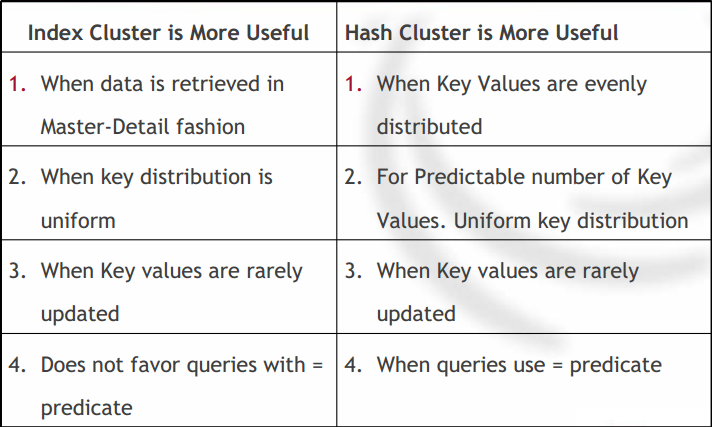
  • Clusters are further divided into 2 types - hash cluster and index cluster.
  • Index cluster uses index to maintain the records in table.
  • Hash cluster uses a hash algorithm to locate a row in the table and are better suited for searches where equality operator is used.

These are few points of difference between hash and index based clusters.


INDEX ORGANIZED TABLES

  • Normally the index and the rowdata are stored separately; it increases the storage space . But IOTs store the rowdata in the index itself; which makes it fast and low on memory.
  • Uses a B-Tree index structure to store index.
  • The PK is a must for using IOTs. Data is stored in the PK itself.

Honorable mention for a storage structure used by oracle internally.

To minimize the loss of data, oracle uses redo log files. The size of the files can be configured. 
The lesser the size, the smaller the loss of data be.
And to create even more safeguard for failure, we can use redo log groups.
redo log files can be multiplexed as well and in this, multiple copies of the updates are saved.These multiple copies create a group.


The process of archiving the redo log files is called archiving.  
 But server has to be run in the archivelog mode.
Log Writer process(LGWR) is not allowed to reuse or overwrite redo log files until its archived.

Oracle can start multiple archived processes and this can be initiated multiple times. At a single time maximum of 10 archival processes can be started.


SELECT * FROM v$log;
If you want to see the information on redo log files.

02 July, 2015

RDBMS Performance Tuning Material | Part one

1. There are two levels of perf. tuning ; one is at the application level and other is at the database level.

2. Application Tuning - deals with the tuning of applications like forms, reports; an application is a program which interacts with the database and hense
application tuning involves  controlling the frequency and amount of data the app requests the database to send and receive.

3. Pointers for application tuning
                3.1 Generate EXPLAIN PLAN for all the queries used in the application and ensure tuning is done.
                3.2 Generate EXPLAIN PLAN for the db views as well. Views actually are complex compared to tables as actually a DB request to a view is
translated into a table call internally. And a view might have its own joins so can itself hamper performance if not created correctly. Also take due note if you
have joins of views in the queries.
                3.3 As the size of data increases, there may be a need to create indexes on table columns to ensure performance. But it also involves ensuring
that the queries use the indexes created and there are not too many indexes created.
                3.4 Always prefer to use PK or indexed columns.
                3.5 Use specific scenarios to ensure good throughput. Ex- using ROWID is better compared to using the LIKE operator.
                3.6 Reuse the queries as much as possible as it facilitates the use of shated SQL which helps improve performance.
                3.7 Always remember -"Tuning does not solve the problems of poor design"

4. Pointers for database tuning
                4.1 At DB level, there can three areas where tuning can be done -
                                4.1.1 Memory Tuning - cache and buffers
                                4.1.2 I/O Tuning - data access efficient
                                4.1.3 Contention Tuning - resolve resource availability issues
                4.2 Four basic steps involved in the process of DB tuning which are true for all the above mentioned three areas -
                                4.2.1 Gather information
                                4.2.2 Determine optimal changes
                                4.2.3 Implement changes
                                4.2.4 Monitor database

5. Performance Tools

6. Begin Statistics Utility (UTLBSTAT) and End Statistics Utility(UTLESTAT)
     These scripts help in taking snapshot of oracle instance at a specific interval of time. They use oracle's dynamic performance views(V$) to gather this info.
     First, utlBstat is run and after that oracle instance starts gathering all the performance statistics. It keeps on doing that until instance is stopped or utlEstat
is run. After you run utlEstat, the DB creates a REPORTS.TXT file which contains all the statistical info gathered.

7. EXPLAIN PLAN
     This utility helps DBA to pass a query to optimizer and see how it performs within it.
     To run explain plan, you must have a table created in your schema where you want to gather the statistics.
    >$ORACLE_HOME/rdbms/admin/utlxplain.sql;
    The query used to get the explain plan for any sql statement is:
    EXPLAIN PLAN
    SET STATEMENT_ID = 'QUERY1'
     INTO CORE_TABLE FOR
    SELECT transid, policyno, canx_code
    FROM policy
    WHERE policyno = 100;
    Explain plan works for only DML statements.

8. SQL*Trace and TKPROF
     Unlike explain plan which only generates the query execution path of the optimizer; sqlTrace also generates info like the cpu usage, no of rows fetched
etc.
    Parameters which need to be set in INIT.ORA file before you can run sqlTrace are: MAX_DUMP_FILE_SIZE - max size of the trace file, SQL_TRACE - makes
a trace result to be written to file for every database user; not preferred though, USER_DUMP_DEST - destination where the dump files are written.
    ALTER SESSION SET SQL_TRACE = TRUE; The syntax of the query used to start sqlTrace in sql session.
   For generating the trace file for an application, we can use the PLSQL code; the syntax is:
    BEGIN
                DBMS_SESSION.SET_SQL_TRACE(TRUE);
                     -- the code goes here whose statistics are to be gathered
                     DBMS_SESSION.SET_SQL_TRACE(FALSE);
    END
    Once the file is generated , it needs to be converted into a readable format. TKPROF utility is used for that. The syntax -
    % tkprof trace_file.trc new_file.log
    TKPROF utility converts the unreadable trc file into a log file. There are certain optional parameters present in the syntax.
    EXPLAIN - username password
    INSERT - where to dump both the sql statements and data for each statement
    PRINT - no of queries to be picked in the trace file
    RECORD - specify the output file
    SORT - order the results of tkprof

9. With both explain plan and trace files, few pointers help to estimate the performance parameters:
                9.1 There should be a few logical I/O blocks versus a large no of rows returned. Optimal ratio is 2:1
                9.2 mostly, execute value should be higher than the parse value. but if no of parses is higher compared to the no of executions, try incresing the
size of the shared pool.
                9.3 No of logical I/O should be higher compared to the physical I/O.

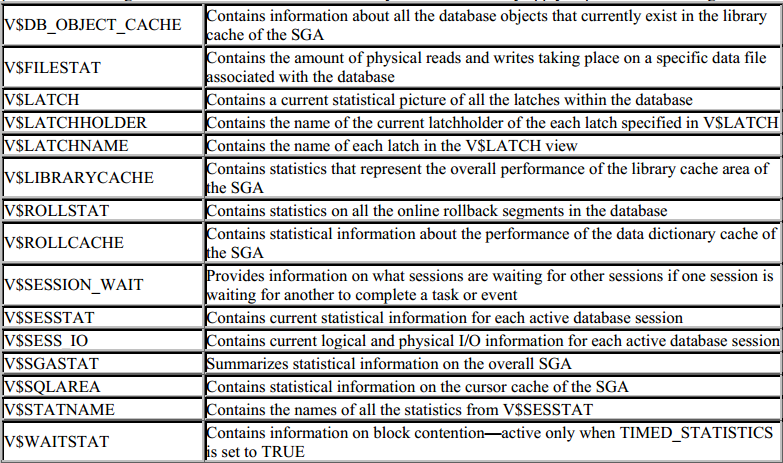
10. Dynamic performance tables - are actually views despite the name.
      are created when the db instance starts.
      these are SGA held memory structures.
      useful for perf. tuning and backup and recovery.


01 July, 2015

PLSQL Interview Questions | Second Set

1. Is it possible to Auto-Refresh the Materialize View?

Yes it is possible. During declaration, you can specify the auto refresh interval of the mview.

Sol:The DBMS_MVIEW package contains three APIs for performing refresh operations: 
•DBMS_MVIEW.REFRESH 
Refresh one or more materialized views. 
•DBMS_MVIEW.REFRESH_ALL_MVIEWS 
Refresh all materialized views. 
•DBMS_MVIEW.REFRESH_DEPENDENT 
Refresh all materialized views that depend on a specified master table or materialized view or list of master tables or materialized views. 
 CREATE materialized VIEW yarpno_mv 2 refresh fast 3 NEXT trunc(sysdate+1) 4 AS SELECT * FROM yarpno; 

2. Explain diff. types of Indexes? Which one is fasted?
(IBM) 

3. How to send mails multiple customers in a single select query?(Bahwan Cyber Tech) sol : UTL_SMTP , UTL_MAIL 

4. Explain about Nonralization.(Polaris) 

6. What is passed by value & passed by reference? explain with example.(Bahwan Cyber Tech) 

7. What is Direct Path Loader?(IBM) 

8. Diff. between Direct Path Loader vs Conventional Path Loader?(IBM) 

9. Sql loader is for upload or download or both?(LNT) 

10. How to load other than csv file? (iGATE) 

11. How to skip a column in sql loader?(IBM) 

12. DML operations inside the exception handling path ( when others then) is possible? Explain.(Polaris) 

13. What i & g mean by in Oracle versions? (DNB-Dun & Broadstreet) 

14. what are diff. in 10g & 11g? (RAMCO) 

15. what is diff. between cursor & ref cursor? (LNT) 

16. what is diff. between nested table & varray?(iGATE) Greens Technology’s Contact :-9840496320 

17. what is diff. between ref cursor & bulk collect?(Bahwan Cyber Tech) 

18. What is global cursor? (CTS) 

19. what will happen when we use COMMIT in Trigger? (Polaris) 

20. How many number of triggers possible? (LNT) 

21. HOW TO SEE INVALID INDEXES?HOW TO REBUILD INVALID INDEXES USING PL/SQL BLOCK?(Polaris) 

22. TELL ME ABOUT BULK_COLLECT & BULK_BIND.(Bahwan Cyber Tech) 

23. WHAT IS DIFF B/W NOT EXITS & MINUS?(IBM) 

24. What is the physical and logical structure of oracle?(Polaris) 

25. how can u open multiple files in Unix is it possible? 

26. Created procedure has 5 parameters if the same procedure is called with 3 parameters will it work? What is the error will it give? (hexaware) 

27. What is pragma EXCEPTIO_INIT_?(Polaris) 

28. HOW TO COUNT NO OF RECORDS IN TABLE WITHOUT COUNT?(Bahwan Cyber Tech) 

29. HOW TO RETRIVE TOP 3 SALARIES FROM EACH DEPARTMENTS?(IBM) 

30. WHAT IS CONTEXT SWITHCING?(TCS) 

31. WHAT IS BULKCOLLECT? AND ANY RESTRICTIONS IN BULKCOLLECT?(iGATE) 

32. WHAT IS FUNCTIONAL BASED INDEX? WRITE SYNTAX? 

33. CAN YOU ALTER PROCEDURE WITH IN PACKAGE?(iGATE) 

34. IS IT POSSIBLE TO OPEN CURSOR WHICH IS IN PACKAGE IN ANOTHER PROCRDURE?(Polaris) 

35. DIFFERENCE BETWEEN CASE AND DECODE?(iGATE) 

36. CAN YOU USE SYSDATE IN CHECK CONSTRAINTS? IF NO, WHY?(hexaware) 

37. TELL ME SOME IMPORTANT ORACLE 11G FEATURES?(Bahwan Cyber Tech) 

38. IF TABLE DROPPED, THEN WHAT HAPPEN VIEW?(hexaware) 

39. WHICH FUNCTIONS ARE NOT SUPPORTED TO INDEX?(hexaware) 

40. WHAT ARE THE DATATYPES AVILABLE IN PL/SQL, NOT IN SQL? 

41. DIFF B/W EXPLICT CURSOR & FOR LOOP CURSOR?(Polaris) 

42. WHAT IS RAISE_APPLICATION_ERROR?EXPLAIN(IBM) 

43. HOW CAN YOU CALL PROCEDURE IN SELECT STATEMENT?(hexaware) 

44. HOW TO DROP PACKAGE BODY ONLY? 

45. What is the disadvantage of package?(Bahwan Cyber Tech) 

46. CAN USE PRAGMA_AUTONAMOUS_TRANCTIONS IN PACKAGES? 

47. HOW TO DEBUGG YOUR CODE? 

48. How will you move the cursor with out using arrow keys in vi editor in UNIX? 

49. What is grep in UNIX? (Polaris) 

50. How you get latest processed record in unix?(Polaris) 

51. Write a script for check a file if it is available or no If available rename it(unix). 

52. What is inode and explain it (unix)(Polaris) 

53. Write a correlated sub query and explain how it works.(hexaware) 

54. What are different type of triggers? 

55. Write a pl/sql block for trigger at the time of insertion for inserting old and new values in auditing table?(Bahwan Cyber Tech) 

56. If we have both user exception and system exception, which will be handled first? 

57. How to access table from another database? 

58. If I gave a select statement, it contains null data; I gave NO_DATA_FOUND AND OTHERS in exception block? What exception will handles and that procedure compiled or not? It will not compiled why because no choice appear with choice others in exception handler. 

59. How u know whether a table is locked or not?(unix)(Polaris) 

60. How you know what are the preveliges you have? 

61.Is it possible for "two objects have the same name"? 

62. Can you see dba tables? 

63. What is cluster? 

64. What is dual ? can we truncate it ? 

65. What is the difference between truncate and delete? 

66. What is the difference between drop and delete?w 

67. what is explain plan? explain?(IBM) 

68. what is dbms_profiler? what are the uses.explin? 

69. explain the steps you worked with the performance tunning. 

70. what are the stepls for table partioning? explain? 

71. is it composite primary key possilbe? if yes how give example. 

72. what is the diff. between plsql table & record? 

73. Is it possilbe to create index automatically?if yes explain what and how? 

74. how you create views without base table? 

75. what is .bad file? 

76. what is the result for the query - SELECT 'A' FROM DUAL INTERSECT SELECT NULL FROM DUAL; 

77. HOW you pass parameters into package? 

78. To where you use execute immediate? what is the use of it? 

79. is it possible to use Continue statement is in PL/SQL loops? 

80. How many primary key you can use in a table? 

81. What are Difference between WHERE & HAVING? 

83. What is the difference between the cursor declared in the procedure and cursor declared in the package?